
Jeff Pastorius

Don’t wait on the download: How to prepare your internet before a highly anticipated video game release
Game download speed matters before a highly anticipated video game release because large files, required installs, and day-one updates can delay first play. Preparing your internet ahead of time can help you check your speed,...

Fiber vs. cable internet for small business?
Fiber vs. cable internet for small business comes down to how your company uses the connection every day. Fiber internet can help support upload-heavy work, low-latency applications, cloud tools, and video calls, while cable internet...

Benefits of having reliable internet at home
Reliable internet at home helps support learning, career preparation, community connection, entertainment, telehealth, household management, and daily routines. It can make it practical to take online classes, build digital skills, apply for jobs, stay in...

Tips to lower your internet bill
Lowering your internet bill usually starts with understanding what you pay for today. Review your bill, remove services you do not use, check whether your plan still fits your household, and ask your provider about...

How can parents manage screen time during the school year without constant arguments?
Parents can manage screen time during the school year by setting predictable schedules, making homework and productive activities the first priority, creating device-free family moments, and using parental control tools to reinforce the plan. Home-network...

Students can take advantage of a $50/mo. internet offer
Students and apartment residents looking for affordable monthly internet can take advantage of a Quantum Fiber® from AT&T offer with speeds of up to 1 Gig at $50/mo. +taxes & fees with AutoPay for new...

Benefits of having multiple Wi-Fi networks for Business
Multiple Wi-Fi networks for business can help separate staff, guests, devices, and point-of-sale traffic so each group has the right level of access. This approach, often called Wi-Fi network segmentation, can help organize connectivity, support...

Benefits of having multiple Wi-Fi networks at home
Having multiple Wi-Fi networks at home means creating separate connections for different groups of devices, such as personal devices, kids' devices, smart home gadgets, and guests. This approach helps support stronger security, steadier performance, and...
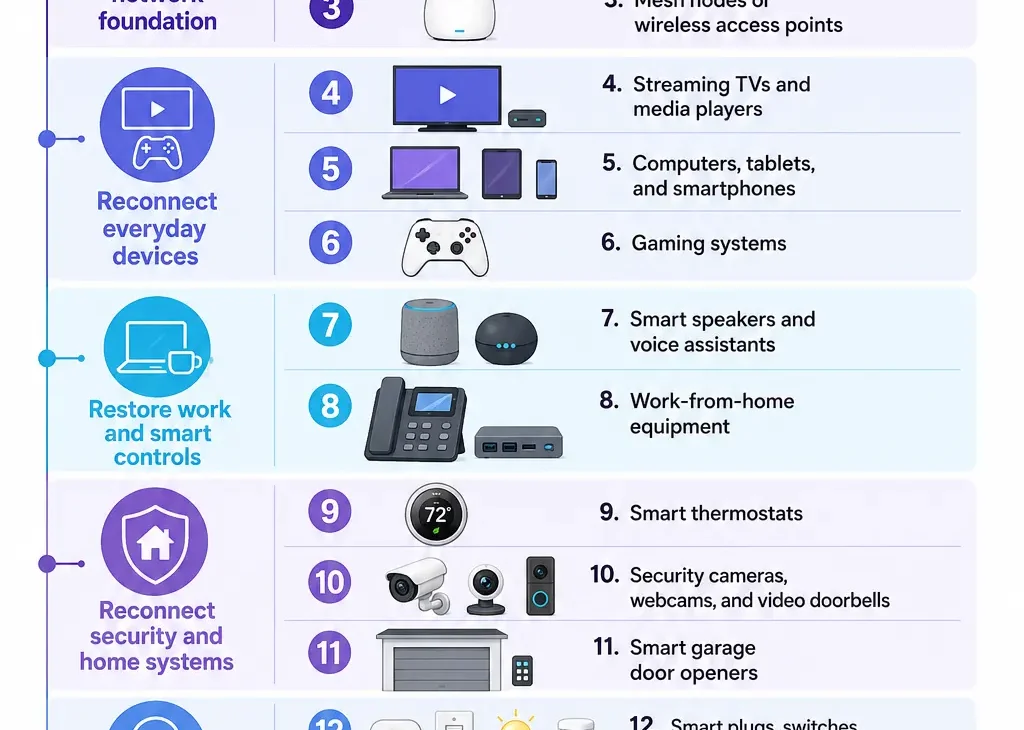
Changed your Wi-Fi SSID? Here’s the best order to reconnect your devices.
If you changed your Wi-Fi SSID (the unique name assigned to your Wi-Fi network), reconnecting your household tech in a strategic sequence helps minimize downtime and frustration. Starting with your primary gateway, move next to...

Fiber internet isn’t just about download speed: 4 overlooked perks that completely change how you work and play
While download speed often gets the most attention, the true power of a fiber-optic connection lies in its comprehensive performance benefits. Overlooked perks like symmetrical upload speeds, low-latency responsiveness, expanded bandwidth capacity, and physical durability...