

Game download speed matters before a highly anticipated video game release because large files, required installs, and day-one updates can delay first play. Preparing your internet ahead of time can help you check your speed, review your Wi-Fi setup, and decide whether available fiber internet options better support your gaming household.
There is a very specific kind of frustration that only gamers know: The game is finally available, your friends are already loading in, and your screen is still counting down a massive download. I have seen this happen in my own house before a big release weekend. The controller was charged, the snacks were ready, and the whole night turned into watching a progress bar creep forward instead of actually playing.
That experience is becoming more common because video games are no longer just something you buy once and play from a disc. Even when you buy a game at a store, the physical case may include a download code, a partial install, or a disc that still requires a full installation and online updates. For a highly anticipated video game release, your internet connection should be part of your pre-launch-day plan, giving you time to check your speed, review your Wi-Fi setup, and explore available internet options before everyone is ready to play.
Key takeaways
- Large video game downloads, installs, and updates can take time, especially when many players are downloading at once.
- Physical game purchases often still require a digital install, download code, or required update before play.
- Download speed affects how quickly large game files arrive, while latency matters once online play begins.
- Fiber internet can help support gaming households with fast downloads, low latency, and multiple connected devices.
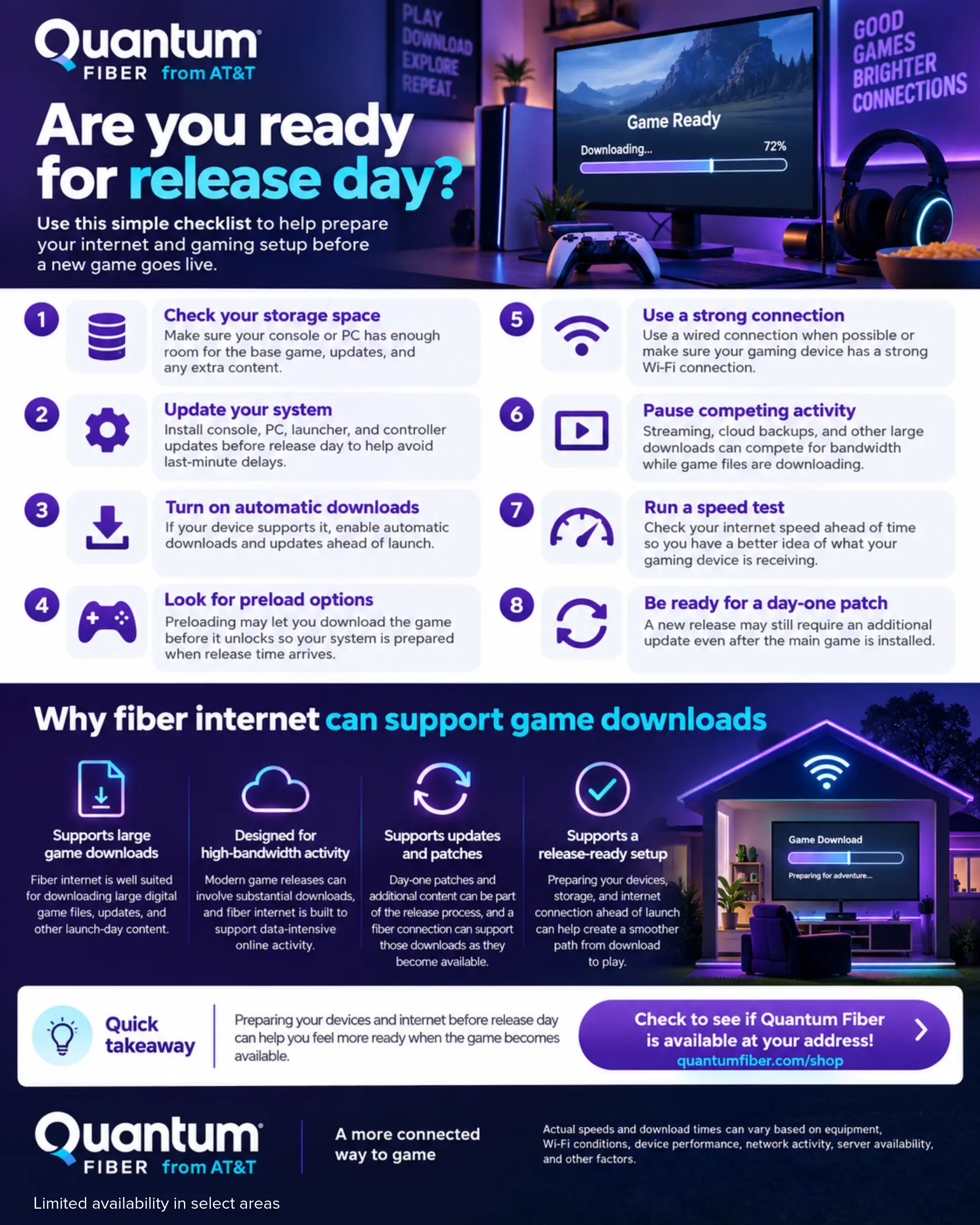
Why downloads can feel bigger than expected on release day

A highly anticipated video game release can create a perfect storm for waiting: a large base game, a required install, a day-one patch, and many players trying to download around the same time. Online gameplay itself may not always use huge amounts of data every minute, but modern game downloads and updates can be large enough to make preparation worth it.
That is why game download speed deserves attention before release day. A faster connection can help reduce the time it takes to download large game files, but speed is only one part of the experience. Your device storage, home Wi-Fi setup, console settings, and household internet activity can all affect how ready you are when the countdown ends.
Typical video game download sizes to plan for
Download sizes vary widely, but general planning ranges can help explain why it is worth checking your internet before release day.
Swipe or scroll horizontally to view the full table.
| Type of download | Approximate planning range | Why it matters before release day |
|---|---|---|
| Smaller indie or casual game | 1–10 GB | May download quickly, but updates can still add time. |
| Standard console or PC game | 20–60 GB | Can take longer when multiple devices are online at the same time. |
| Large new release | 70–150+ GB | Worth preparing for early, especially if preload options are available. |
| Day-one patch or major update | 5–50+ GB | Can delay first play even after the base game is installed. |
| Optional texture packs or add-ons | Varies widely | Extra content can increase the total download size. |
Download sizes vary by game, platform, edition, update schedule, and optional content. Use these ranges as general planning examples, not exact file-size expectations.
Common release-day slowdowns to check before the game drops
- Large base file: Big releases may require a substantial initial download before the game can open.
- Day-one patch: Some games need an update before online features, stability fixes, or new content are available.
- Console or PC storage limits: A full storage drive can pause the download until older files are removed.
- Busy home network: Streaming, work calls, cloud backups, and other devices can compete for bandwidth.
- Wi-Fi placement: Distance from the router, walls, and interference can affect the speed your device receives over Wi-Fi.
Why physical copies do not always mean instant play

Buying a game in a store used to feel simple: bring it home, put the disc in, and play. Now, the box may be only part of the process. Many modern games rely on full installations, digital licenses, content packs, account verification, or downloadable updates before the first session begins.
In practical terms, a physical purchase does not always avoid a video game download. In some cases, the disc or card acts more like a key to access the content, while the console or PC still pulls a large amount of data from the internet. In other cases, the game may be playable from installed files but still need a sizeable update before online modes, performance fixes, or launch content are available.
A quick real-world example
The lesson I have learned is to treat a big game release like a small tech setup, not just a purchase. Before a major release weekend, I check the game listing, clear storage, update the console, and make sure the main gaming device has a strong connection. That small prep routine can turn release night from “why is this still downloading?” into “which mode are we playing first?”
How to prepare your internet before release day
You do not need to be a network engineer to get ready for a highly anticipated video game release. A simple checklist can help you avoid the most common launch-day delays.
- Check your available storage. Make sure your console or PC has enough room for the base game, updates, and any optional content you plan to install.
- Update your system first. Console, PC, launcher, and controller firmware updates can create extra delays if you leave them until release night.
- Turn on automatic updates when appropriate. If your device supports automatic downloads, confirm the settings before launch week.
- Use a strong connection for the first download. If possible, place the device close to your router or use a wired connection for the largest download.
- Limit competing activity during the download. Large streaming sessions, cloud backups, and other big downloads can compete for bandwidth.
- Test your speed ahead of time. Run a speed test before launch day so you understand what your device is actually receiving.
One important note: advertised internet speeds generally describe the connection delivered to compatible equipment, while speeds over Wi-Fi may vary based on the device, distance from equipment, home layout, interference, network conditions, and other factors. If your speed test looks lower than expected, your Wi-Fi setup may be part of the issue.
Why fiber internet can help support gaming households
Fiber internet is designed to support bandwidth-intensive and latency-sensitive activities, including downloads, streaming, video calls, and online gaming. For a gaming household, that matters because launch night rarely happens in isolation. Someone may be streaming a show, another person may be on a video call, and the game download may be pulling a large file at the same time.
Quantum Fiber® from AT&T offers fiber internet designed to deliver fast, reliable performance for modern connected homes, with unlimited data, no annual contract, and speed options that may vary by address and plan. Most Quantum Fiber plans are designed to support symmetrical upload and download speeds where available, while multi-gig speeds in select locations may offer speeds of up to 2 Gig, up to 3 Gig, and up to 8 Gig.
Swipe or scroll horizontally to view the full table.
| What to check | Why it matters |
|---|---|
| Download speed | Helps determine how quickly large game files, patches, and updates can download. |
| Upload speed | Supports activities like voice chat, livestreaming, cloud saves, and multiplayer data sent from your device. |
| Latency | Affects how responsive online gameplay can feel during real-time actions. |
| Wi-Fi setup | Can affect the speed and consistency your gaming device receives inside the home. |
| Household device use | Streaming, video calls, and other downloads can compete for bandwidth during install time. |
Don’t wait on the download

A highly anticipated video game release should feel exciting, not like a race against your download queue. Preparing your internet before release day gives you a practical advantage: your storage is ready, your devices are updated, your speed has been checked, and you still have time to explore a different internet option if your current setup does not match your household’s needs.
Fiber internet can help support that preparation by delivering fast, reliable performance for connected homes and low-latency internet performance for real-time activities like online gaming. It also helps when the rest of the household is online at the same time, whether that means streaming, working, learning, or using smart home devices.
Before the next major release, take time to check your internet setup instead of leaving everything to release night. Run a speed test, review your storage, update your device, and confirm whether fiber internet options are available at your address. If you decide you need to switch providers or explore a different plan, making that decision ahead of time can help you feel more prepared when the game finally unlocks. Would you rather spend release day adjusting settings—or joining the first match?
Frequently asked questions on game download speed
Why do video game downloads take so long?
Video game downloads can take a long time because modern games often include large files, high-resolution assets, online content, and required updates. Your download time can also depend on your internet speed, Wi-Fi connection, device storage, platform traffic, and other household activity.
Does buying a physical game mean I do not need to download anything?
Not always. Many physical games still require installation, online updates, or downloadable content before the full experience is available. Some store-bought versions may also include a download code instead of a traditional playable disc.
Is download speed the same thing as low latency?
No. Download speed affects how quickly files move to your device, while latency measures how quickly your device communicates with a game server. Download speed matters when installing the game, and low latency matters once real-time online gameplay begins.
How can I check whether my internet is ready before release day?
Start by running a speed test, checking available storage, updating your console or PC, and making sure your gaming device has a strong connection. If possible, test from the same room and device you plan to use on release day.
Can fiber internet help with video game downloads?
Fiber internet can help support large downloads, connected gaming, streaming, video calls, and multiple devices in the home. Actual speeds and performance may vary based on plan, equipment, Wi-Fi conditions, device capability, network conditions, and availability at your address.
Content Disclaimer - All content is for informational purposes only, may require user’s additional research, and is provided “as is” without any warranty, condition of any kind (express or implied), or guarantee of outcome or results. Use of this content is at user’s own risk. All third-party company and product or service names referenced in this article are for identification purposes only and do not imply endorsement or affiliation with Quantum Fiber. If Quantum Fiber products and offerings are referenced in the content, they are accurate as of the date of issue. Quantum Fiber services are not available everywhere. © 2026 AT&T Intellectual Property. AT&T and the Globe logo are registered trademarks of AT&T Intellectual Property. All other marks are the property of their respective owners.