

Multiple Wi-Fi networks for business can help separate staff, guests, devices, and point-of-sale traffic so each group has the right level of access. This approach, often called Wi-Fi network segmentation, can help organize connectivity, support security, and reduce the chance that visitor devices interact with internal business systems.
Think about a busy morning at your business. Employees are opening cloud apps, customers are asking for guest Wi-Fi, a payment terminal is processing transactions, cameras are recording, and smart devices are connected in the background. If everything shares one network, it can become harder to manage who connects, what they can access, and which devices need priority.
That is where separate Wi-Fi networks can help. Instead of treating every connection the same, a business can create different network names for different purposes. For example, a guest network like Business-WiFi-Guest can give visitors internet access while keeping internal tools on a separate employee network.
Separate Wi-Fi networks can help a business match network access to real-world needs. The goal is not complexity for its own sake; it is clearer control over who connects and what each connection is used for.
- Guest Wi-Fi can help visitors get online without placing them on the same network as employee devices or internal systems.
- Employee Wi-Fi can support day-to-day work tools such as laptops, phones, cloud apps, and collaboration platforms.
- Device-specific Wi-Fi can help organize smart devices, printers, security cameras, and other connected equipment.
- Point-of-sale or operations networks can be set aside for systems that support payments, scheduling, inventory, or business-critical workflows.
Table of Contents
What are multiple Wi-Fi networks for business?
Multiple Wi-Fi networks are separate wireless network names, also called service set identifiers (SSIDs), that can be created for different users, devices, or business functions. Each network can be configured with different access rules, passwords, permissions, and security settings.
In practice, that means your team, visitors, connected devices, and operational systems do not need to share the same wireless space. A business might use one network for employees, another for guests, another for smart devices, and another for point-of-sale systems. This structure is often part of Wi-Fi network segmentation, which divides wireless access into separate areas with distinct rules.
| Network Type | Example Network Name | Common Use |
|---|---|---|
| Employee Network | Business-WiFi-Team | Staff laptops, phones, and approved work devices |
| Guest Network | Business-WiFi-Guest | Customers, clients, vendors, and visitors |
| Device Network | Business-WiFi-Devices | Printers, cameras, displays, smart thermostats, and other connected equipment |
| Point-of-Sale Network | Business-WiFi-POS | Payment terminals, registers, or systems that support transactions |
Why businesses use separate Wi-Fi networks
Businesses often use separate Wi-Fi networks because different people and devices need different levels of access. A customer waiting in your lobby may only need internet access. An employee may need access to internal tools. A printer may need to communicate with approved work devices. A payment system may need a network designed around operational control.
Separate networks can help support security
A guest network can help reduce the chance that visitor devices interact with employee computers, printers, business files, or internal systems. This is especially useful when visitors, vendors, temporary workers, or customers need internet access while they are on-site.
Separate networks can help organize traffic
When every device connects to the same Wi-Fi network, it can be harder to understand what is using the connection. Separate networks make it easier to group devices by purpose, such as employee work, visitor access, connected equipment, or business operations.
Separate networks can help simplify access management
If a guest Wi-Fi password needs to change, your team can update that network without disrupting employee devices or connected equipment. Likewise, a device network can use access rules that fit printers, cameras, or smart displays without sharing the same credentials used by staff.
Common business Wi-Fi network examples
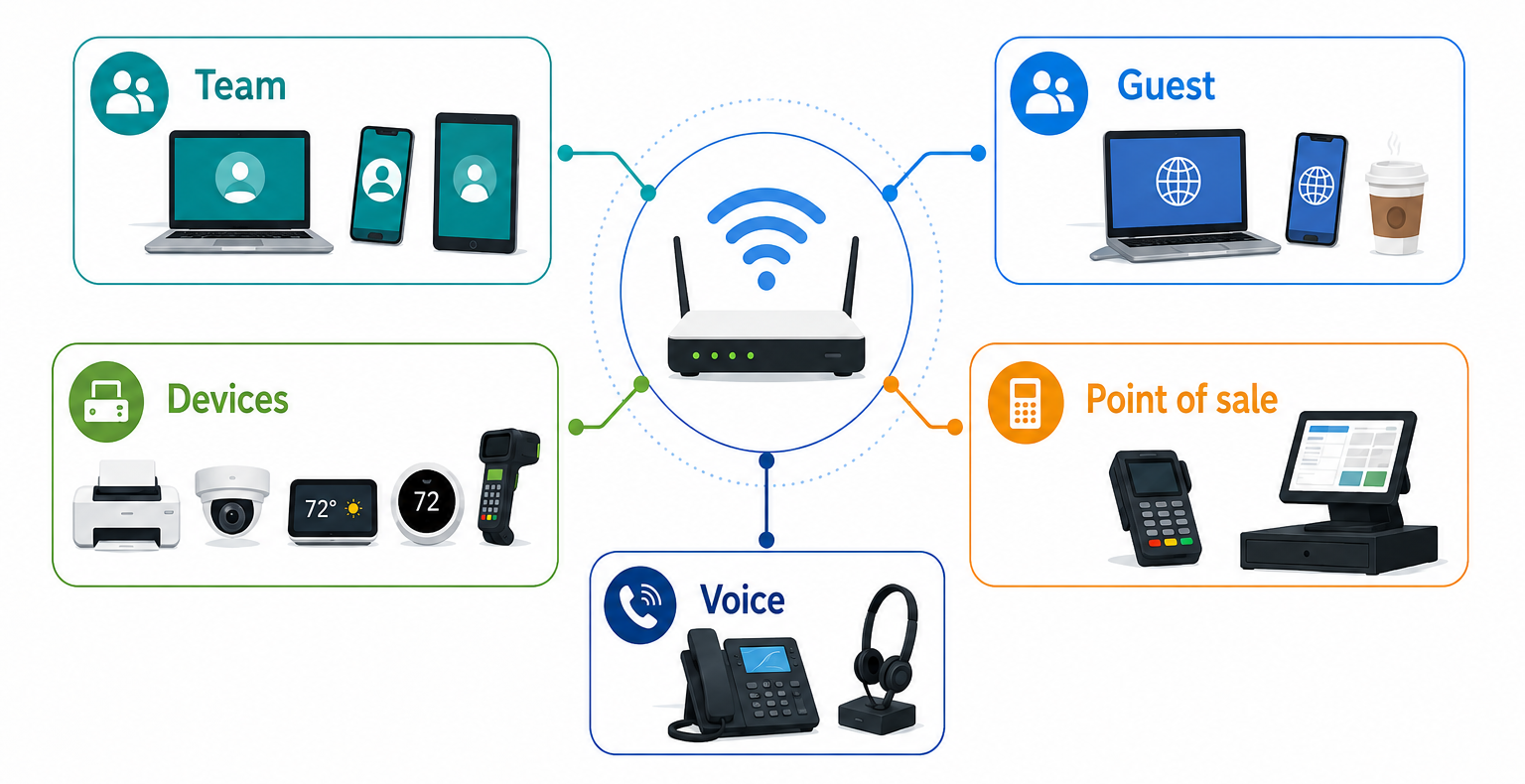
The right network structure depends on the type of business, the devices in use, and the level of access each group needs. Many small businesses can start by thinking in terms of four core network categories: team, guest, devices, and operations.
- Business-WiFi-Team: For employees using approved laptops, phones, tablets, and collaboration tools.
- Business-WiFi-Guest: For customers, clients, vendors, or visitors who need internet access while on-site.
- Business-WiFi-Devices: For connected devices such as printers, smart displays, security cameras, thermostats, and inventory scanners.
- Business-WiFi-POS: For payment terminals, registers, or transaction-related systems that need a dedicated network path.
- Business-WiFi-Voice: For Wi-Fi-connected voice equipment, if the business uses that type of setup.
Your IT provider or technology partner can help decide which networks are appropriate for your business, equipment, and security needs. This can be especially helpful if your setup includes payment systems, shared printers, cameras, smart devices, or visitor access.
A restaurant might use a guest network for customers, a team network for staff tablets, a device network for kitchen displays, and a point-of-sale network for registers. A medical office might use a staff network for approved workstations, a guest network for patients, and a device network for printers or check-in kiosks. A professional services firm might use separate networks for employees, clients, conference room devices, and shared office equipment.
How to choose clear Wi-Fi network names
Clear network names help employees and visitors choose the right Wi-Fi connection without guessing. A good business Wi-Fi name should be short, easy to recognize, and tied to the network purpose.
| Network Purpose | Example Name | Why It Works |
|---|---|---|
| Guest access | Business-WiFi-Guest | Easy for visitors to identify and separate from employee access. |
| Employee access | Business-WiFi-Team | Simple internal label for approved staff devices. |
| Connected devices | Business-WiFi-Devices | Groups equipment that does not need the same access as employees. |
| Payment systems | Business-WiFi-POS | Creates a clear label for transaction-related devices. |
Try to avoid network names that reveal sensitive internal details, such as department systems, owner names, building access information, or software tools. A name should be helpful without giving unnecessary clues about how your business is organized.
How Quantum Fiber can support business connectivity
A thoughtful Wi-Fi setup works well when it is supported by a dependable internet foundation. Quantum Fiber® from AT&T offers fiber internet designed to support business connectivity needs, including video calls, cloud tools, file sharing, connected devices, and customer-facing online access.
For businesses with lots of connected devices or upload-heavy workflows, symmetrical speeds on most plans can help support activities such as sending large files, backing up data to cloud platforms, and joining real-time meetings. Quantum Fiber from AT&T also offers advanced Wi-Fi technology powered by Wi-Fi 7, which can help support modern connectivity needs.
- Advanced Wi-Fi technology: Uses Wi-Fi 7 to help support connected devices, streaming, video calls, and everyday business applications.
- Low-latency performance: Designed to support real-time activities such as video calls and interactive cloud tools.
- App-based controls: The Quantum Fiber app can help customers customize and monitor their Wi-Fi experience.
- No annual contract: Businesses can explore connectivity options without an annual service commitment.
For businesses that need multiple custom Wi-Fi network names, also called SSIDs, compatible commercial mesh hardware or business-grade access points may be the right fit for that advanced setup. The included Quantum Fiber from AT&T Wi-Fi system is designed for straightforward Wi-Fi needs and does not natively support multiple custom SSIDs.
In this setup, the internet service and the Wi-Fi management hardware play different roles: the internet connection brings service to the business, while the Wi-Fi hardware determines how network names, access rules, and device groups are organized.
Availability, equipment, and plan options can vary by location. Businesses should check availability to review current plans, equipment options, and service details for their address.
Set up business Wi-Fi with purpose

Multiple Wi-Fi networks can give your business a cleaner way to organize access for employees, guests, connected devices, and operational systems when your Wi-Fi hardware supports that kind of setup. Instead of relying on one shared network for every connection, compatible commercial mesh hardware can help create a structure that reflects how your business actually works.
The example network name Business-WiFi-Guest is a practical starting point for customer or visitor access. From there, names like Business-WiFi-Team, Business-WiFi-Devices, and Business-WiFi-POS can help make each network purpose clear.
If your business depends on cloud tools, digital payments, video calls, and connected devices, a structured Wi-Fi setup can help support a dependable online experience. Quantum Fiber from AT&T can serve as the fiber internet foundation, while compatible commercial mesh hardware or business-grade access points can manage advanced Wi-Fi needs such as multiple custom network names, where that level of setup is needed.
When your network names, access rules, and internet service work together, your Wi-Fi can feel less like a shared utility and more like a business tool. What parts of your business could benefit from having its own dedicated Wi-Fi network?
Frequently asked questions on multiple Wi-Fi networks for business
What is the benefit of having multiple Wi-Fi networks at a business?
Multiple Wi-Fi networks can help a business separate access by user type or device purpose. For example, employees, visitors, smart devices, and payment systems can each connect to a network designed around their needs.
What should I name a guest Wi-Fi network?
A clear guest Wi-Fi name should be easy for visitors to recognize. Examples include Business-WiFi-Guest, MainStreetCafe-Guest, or SmithDental-Guest. Avoid using names that reveal private internal systems or sensitive business details.
Should guest Wi-Fi be separate from employee Wi-Fi?
Yes, many businesses separate guest Wi-Fi from employee Wi-Fi to help limit visitor access to the internet rather than internal systems. This can help support security and make access management easier when guest passwords need to be updated.
What devices should go on a device-only Wi-Fi network?
A device-only network can be useful for printers, smart displays, cameras, thermostats, inventory scanners, and other connected equipment. Keeping these devices grouped can help simplify management and avoid placing them on the same network used for employee work.
How many Wi-Fi networks should a small business have?
The number depends on the business, but many small businesses start by considering networks for employees, guests, connected devices, and point-of-sale or operational systems. If multiple custom Wi-Fi network names are needed, a technology provider or IT professional can help decide which compatible commercial mesh hardware or business-grade access points make sense for your location, equipment, and security needs.
Content Disclaimer - All content is for informational purposes only, may require user’s additional research, and is provided “as is” without any warranty, condition of any kind (express or implied), or guarantee of outcome or results. Use of this content is at user’s own risk. All third-party company and product or service names referenced in this article are for identification purposes only and do not imply endorsement or affiliation with Quantum Fiber. If Quantum Fiber products and offerings are referenced in the content, they are accurate as of the date of issue. Quantum Fiber services are not available everywhere. © 2026 AT&T Intellectual Property. AT&T and the Globe logo are registered trademarks of AT&T Intellectual Property. All other marks are the property of their respective owners.